 …or “How to improve your appalling ADSL speeds to what they told you you’d get speeds”
…or “How I split my ADSL and telephone signals and shoved them down a Cat5e cable”.
Update 18/03/2015: This post mentions site clarity.it which has since changed its name to www.claritybroadband.co.uk – HOWEVER, the last time I attempted to order from them in Summer 2014 I had absolutely no response after several weeks and ended up having to reclaim funds from Paypal. For that reason, I have decided to remove the link to clarity in the text below, but the rest of the text may still be of interest.
OK. So this post is not about a blag or any mechanism whereby you can get more speed than you paid for. It probably only applied to people with a lot of pre-existing phone cable in their home, and it will probably only help people who have a reasonable interest in wiring and so on.
My previous ADSL service was supposedly capped at around 4Mb/s – because I consistently saw speeds lower than that on BroadbandSpeedChecker and similar sites. It so consistently hung around 3Mb/s that I assumed that they were actually capping me lower than the paid-for speed; and as this service was the basis of a television service too, I would often see extremely poor connection speeds if anyone was watching TV. Various research showed that the service in my area ought to have a physical limit of about 13Mb/s*, so I felt I ought to be able to get my paid-for 4Mb/s easily. For various reasons, I decided to move to get Sky TV as a TV supplier, and O2 as an ADSL supplier, with speeds ‘up to’ 20Mb/s – but with ‘expected speeds in my area’ of 13Mb/s.
Skipping briskly past the cock-up on the day of transfer that left me with no phone line** (but thankfully I did get my new ADSL by the end of the day) I was shocked to find that my broadband speed had actually lowered to about 2.5Mb/s. How was it possible that a faster service could end up slower than the previous service?
Lots of research later, and frankly loads of tests, showed me that if I plugged my ADSL router into the ‘test’ socket I could indeed achieve connection speeds around 13Mb/s… but as soon as I connected in the face-plate (to which my phone lines for the rest of the flat were attached) speeds dropped horrifically. Bluntly, the phone lines under the floor in my flat were the problem.
Note: The master socket in your home generally marks the point at which the wiring owned by BT from the exchange becomes yours and your responsibility. You are apparently allowed to modify wiring connected to the face-plate (and the face-plate itself) but you are not allowed to change the back-box or any wiring in the back-box.
Now, many people in this situation would be able to make do with a wireless router and wireless phones and voilà, you are done. But for various reasons, my phone line comes into the kitchen at the back of the flat and it would have been inconvenient to have a phone base-station and router there.
My first test was to get a new phone-line extension kit, cut out the existing under-floor wiring, and just string out the 15m of new cable extension to the hall and retest with the ADSL router there. Connection speeds were about 10Mb/s, which I felt was tolerable, and it proved that there was nothing wrong in concept with having phone extensions, it was just the wire under the floor that was the problem. But, before I made a permanent wiring to the hall, I researched my options, and thanks to the excellent site at clarity.it, I decided to try and wire my extension with a pre-filtered ADSL signal, and to run the extension with the phone signal and the ADSL signal through a single cat5e cable.
Here’s what I bought:
- A modified BT ADSL NTE5 Master ADSL adapter which is basically an ADSL filter that fits on a standard BT NTE5 Master Socket Unit (where the phone line enters the property). What’s special about this is that it has a built in ADSL filter, and points for hard-wiring extensions ‘with’ and ‘without’ the filter in the line;
- ‘Krone’ type punch-down tool for making the connections ‘professionally’;
- A dual outlet secondary faceplate, with one RJ11*** output (for the ADSL unfiltered signal) and a BT-type phone socket for the phone line, also a face-plate and box-box to hold these;
- A long Cat5e cable with solid copper cores (stranded cores are for shorter ‘patch’ cables)!
Here’s the deal; by using a pre-filtered face-plate, we are saving ourselves the bother of having filters on every phone socket around the house. We literally split off the ‘unfiltered’ ADSL signal onto two wires, and the ‘filtered’ phone signal onto two (or potentially four) wires. And hopefully, the one centralised filter is a better quality than the usual ones.
Wiring
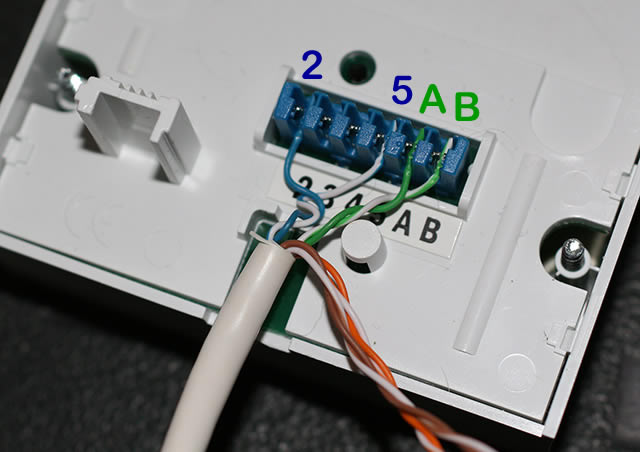
At the face-plate end, we strip outer sleeve of the Cat5e cable and fix the wires as follows:
- Pin 2: Blue wire
- Pins 3 and 4 left unconnected
- Pin 5: Blue and White wire
- Pin A: Green wire
- Pin B: Green and White wire
It’s sensible to use the blue pair in the noted configuration, because this is roughly the same standard as BT wiring#. The wires to pins A and B could actually be any colour, but I chose green. The other four wires (brown and orange pairs) were cut short (though both images to the right show them uncut).
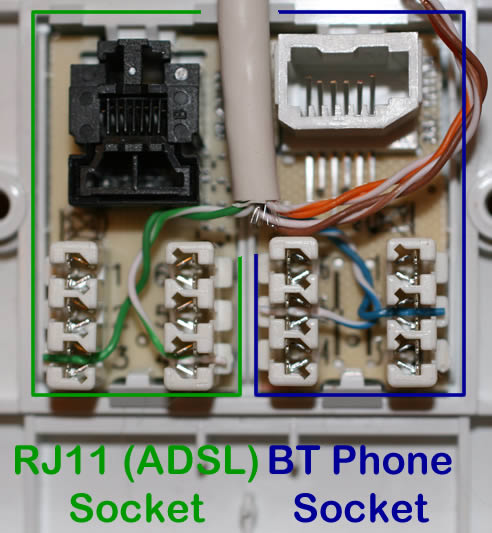 At the other end of the cable, I connected the BT phone socket as follows (note how I have left as much wire twisted as possible):
- Pin 2: Blue wire
- Pin 5: Blue and White wire
and the RJ11 socket:
- Pin 3: Green wire
- Pin 4: Green and White wire
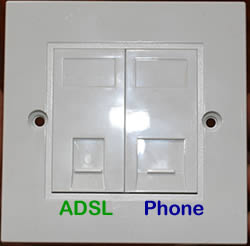 After testing with the router plugged into the new RJ11 socket, I found my ADSL box was connecting at over 13Mb/s… which was a 2-3Mb improvement over the normal phone line extension, for twice the length of wire.
I then started the whole process again as I had to thread the cable through a couple of walls and fix it in place (but this was a lot more preferable than fixing it in place and finding it offered no advantage!)
Conclusions
It was of course a pain that my pre-existing wires could not handle ADSL signals very well, and personally I would prefer the cables to have been hidden… but from a signal noise perspective, I am confident that the use of the Cat5e cable and (what I hope are) high quality components that I have squeezed just about everything out of the ADSL signal that is currently possible. Additionally, routing the cables above floor-level means they actually get manhandled less; below the floor even these components may have suffered as they would have been nearer electric cables, and had to be pulled-through literally tens of joists. This could have damaged the cable, and the proximity to power and other services could have interfered with the ADSL signal more. In contrast, the cable route above the floor allowed for feeding through just two walls and well away from other signals.
Notes
* ADSL relies on copper wires being used for your phone line from the exchange, and the maximum speed possible depends heavily on your distance from the exchange. As I was less than a mile from the exchange, I hoped to be able to have an ‘expected’ speed of around 17-18Mb/s, but as it was 13 was the very best number that was estimated by various sites. It should also be noted that most of the actual speeds shown on this page are retrieved from the router, not Broadbandspeedchecker; the speed that your router connects to the exchange will always be higher than the speed you see on speed-test sites (another factor that I had not fully taken into account)
** BT support were adamant that this was not related to the ADSL switch-over and that I had to be available to have an engineer visit. Sure enough the engineer did find that they had screwed up at the exchange; but overall it was worthwhile, as he fitted my historic master socket with a new NTE5 version (which was fundamental to the above process) and wired me into a new phone line back to the exchange. All-in, it was a very worthwhile visit considering the desire for faster ADSL!
*** Although the clarity.it site and others will tell you that an RJ45 socket can be used to accept an RJ11 plug, I tried it and was not impressed by how much the plug could wobble. I decided to go for the proper RJ11 outlet to help distinguish it.
# So, for example, Sky had wired in a new phone extension during my Sky installation, and this had to be disconnected (which is technically against their T&C) during all this testing. I was able to strip the plug on their extension cable, and hard wire their phone extension into this new face-plate too; Blue/White wire onto pin 2, White and Blue onto pin 5.
18/03/2015 Reminder: Due to issues experienced since this post with the website clarity.it, I recommend caution before placing an order.
I would like to know the RJ11 ADSL & the BT phone sockets you purchased as I have followed your wiring instructions and the internet will not connect.
Hi Ray, The items I purchased are noted in the post; the ‘modified BT ADSL NTE5 Master ADSL adapter’ from Clarity.it
Hello again, Thank you for your response. On first reading your article which was very explicit, and my situation being identical, with the phone being an old fashioned plug in type in the office.
I had no hesitation I went straight onto the Clarity site and ordered the equipment, after installation and reading your article again.At the secondary dual outlet you were unhappy with the ADSL/RJ45 connection, so you acquired the “Mkcoy” an ADSL/RJ11.
My Sky router seems to be of a similar feeling and it is this ADSL/RJ11 unit I have been trying to get, so far with no success.I have even considered that I should re install my Sky router as that may be upset with my new arrangement at the secondary outlet.
Trust you could help.
Cheers Ray
what if i cut it short rj11 whoud it make it faster my bt socet is 1 feet awey from my router .
You could have used the cable for a 10/100 ethernet connection as well, by using the brown pair for the ADSL, blue pair for the telephone and orange / green pair for the ethernet. You would have needed a 4 module faceplate, but makes full use of the cable.
Hi – I hope you can help. I am setting up system as above but am getting confused with the wiring of the Clarity RJ45/RJ11 module ADSL socket. On the rear of the module RJ11 your picture shows the terminals numbered neatly 1,2,3,4,5 & 6, but on the one I purchased from Clarity the rear terminals (as viewed from rear) are Top Left Green #3; 2nd down Left Green/White #3; Third Down Left Orange #2; Bottom Left Orange/White #2; Top Right Blue #1; 2nd Down Right Blue/White #1; 3rd Down Right Brown #4; Bottom Right Brown/White #4.
This has confused the hell out of me.
From my Clarity ADSL faceplate splitter I have allocated Green (terminal A) and Green/White (Terminal B) wires – just as you have in your excellent diagrams. I just want to know where the hell I attach them to on the RJ11 module socket?
Hi,
I was just wondering where you purchased the individual RJ11 and BT Phone socket modules for your secondary connection plate?
Regards
Alex
@Alex: I purchased them from Clarity as with the other products mentioned.
Dear ksb, I’m a complete novice with regard to telephones but I had managed to to locate clarity.it and had bought exactly the parts you mention, when I found your article – which has been immensely useful. Whilst renovating our main bedroom, I’m adding an ADSL/VDSL adaptor to my NTE5 master socket on the bedroom wall and running a 15m cable to a dual outlet extension faceplate downstairs, where I connect my wireless telephone base and my BT Home Hub 4. I have been thinking of using ordinary 6-core telephone extension cable from Maplin. My question is – rather than using this cable, should I be using Cat5e cable as you have done? Many thanks Mike
Hi Mike, I’m not an expert, and the networking fun I had with this is something of a hazy memory – but it is my recollection that using proper Cat5e cable (or better) was important… I think it was something to do with the quality of the cabling and / or the twists in the pairs of wires… however when I stop and think about it now I think proper phone cable has twisted pairs too? I guess my advice would be to go with Cat5e, but I am not an expert and your mileage may vary.
Good Luck!
Hi ksb, Many thanks for your reply. I’m going to go with the Cat5e which I can do fairly easily whilst I have the floor boards up. Thanks, again, for your great article ‘Achieving Faster ADSL Speeds….’ which has been really useful.
Regards, Mike
Hi KSB, sorry to tack my comments onto an old thread but it came up on my google searching and I thought it might help. I’m in a similar position to you in that I should be getting between 3 and 8 and likely 5meg. I’m actually getting 2.5 and was only getting 2 until they did some work at the exchange recently. My big problem is that the upload speed of about 0.65 is on the limit of usability for Skype. I have obtained a new Mk2 Openreach vDSL faceplate and will be wiring an extension (as you describe above) to a socket in a more useful position. I have found that rather than getting an ADSL and telephone faceplate, you can get a modular faceplate to match your sockets and add an RJ45 and a telephone module. You can get RJ11 modules too of course but if I later get FTTC, I’ll already be set up. To get over the wobbly plug problem you mentioned, I just ordered a replacement RJ45 to RJ11 patch lead for my old modem.
Hi as far as I know the new type socket cuts out wire no 3 which is the wire used to make the phones ring, this 3rd wire is in many old houses and acts as an ariel picking up noise from round the house causing interference, instead of a complete rewire first check at the master socket and disconnect it there before any other work is done, then test speed, may help and save a bit of work and money.
Hi, I have read your wiring method and it agrees with the method I had decided upon following the watching of the video by MyMateVince on Google. The thing that puzzles me is that with the two ADSL wires from the faceplate on the master socket now wired to the pins 3 and 4 in the RJ11 socket will it work with my plusnet router cable which has eight gold coloured connectors when I plug it into the RJ11 socket?
Hi Malc.
I’m afraid the quick answer is that I don’t know; it’s been a long time since I thought about this stuff, and I am certainly not aware of the details of plusnet routers. That said, I thought that RJ11 sockets were not wide enough to accept a RJ45 cable… but the reverse was allowed (see my footnote marked with ‘***’)