I recently started experimenting with Visual Studio 2005 and Visual Studio Tools for Office (VSTO) 2003. This entry is a technical .Net / VS2005 / VSTO blog and will probably not be of interest unless you use these tools yourself.
Yuck. Office applications allow many configuration / add-in options programmatically which are quite impressive, but do not sit well with other .Net development tools. For example, in Forms development, if we want to create a Button on a form programmatically, we declare a new Button(). In VSTO, we declare a new CommandBar, and then have to use the CommandBar.Add() method to create a new button on that toolbar.
One of the first things that I wanted to achieve – after adding a basic toolbar to Outlook 2003, was to add buttons with icons. It was frustrating that this was a topic that seemed to be omitted from the book ‘Visual Studio Tools for Office: Using C# with Excel, Word, Outlook, and Infopath’ (Carter and Lippert), and it almost entirely eluded me as to how to do it. There was the CommandBarButton.FaceId property, useful if you wanted a preset icon on your button (but no apparent documentation of what numbers should be used for which icons). Then there were the Picture and Mask properties that appeared to have relevance to this task, but I could not fathom how to use them. Web searches demonstrated some approaches, even on MSDN, that required the use of the clipboard to load an image; something that could muck up the user’s clipboard and therefore highly undesirable, it seemed to me.
Anyway, I finally found what I needed, on MSDN itself. This was one occasion when a generic web search with Google did not outperform Microsoft’s own site (prior poor recommendations that I had found turned out to refer to previous versions of .Net or VSTO).
But still in all my searches I failed to find documentation of the simplest way of assigning an icon to a button or menu entry, using the FaceId property. Possibly, I missed it; that would be easy in amongst the morass of documentation.
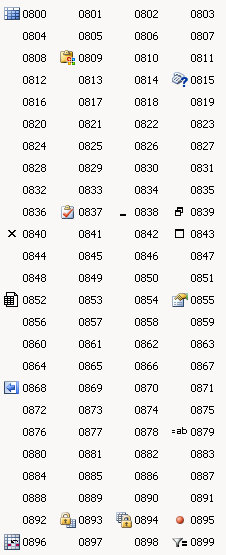
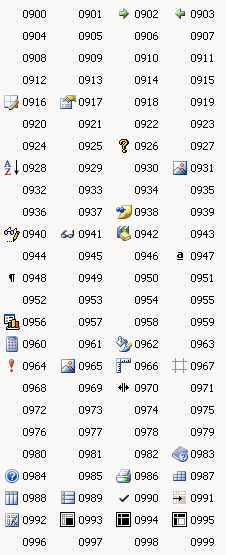
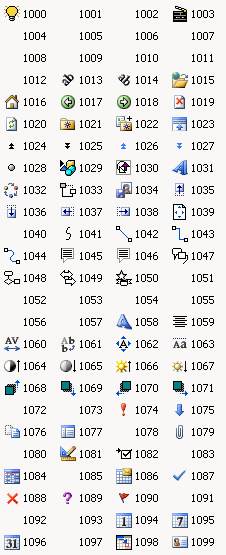
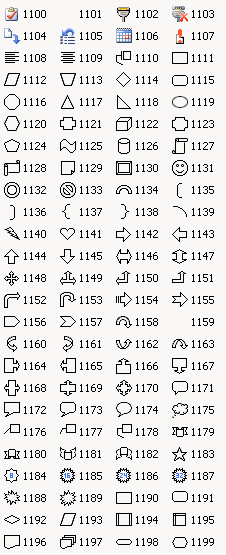
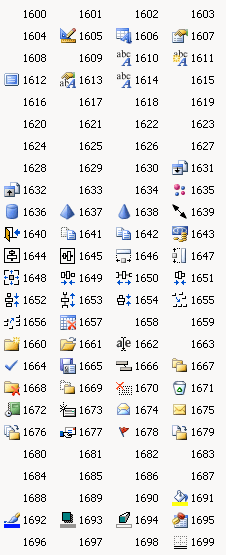
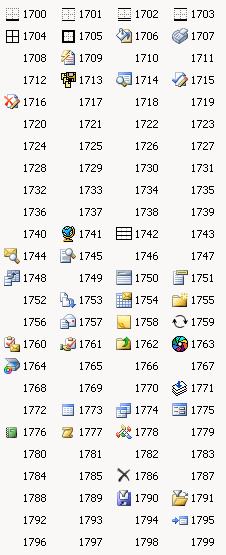
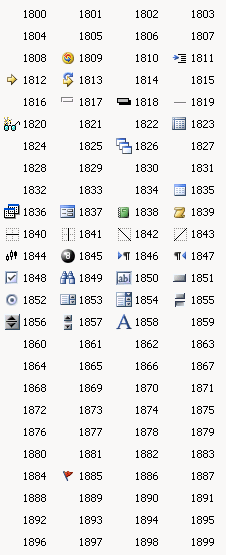
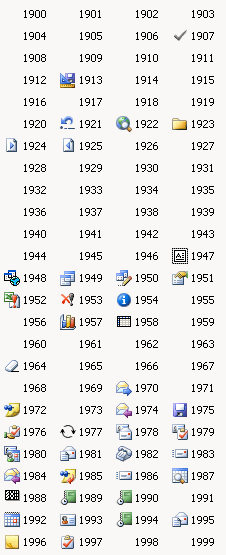
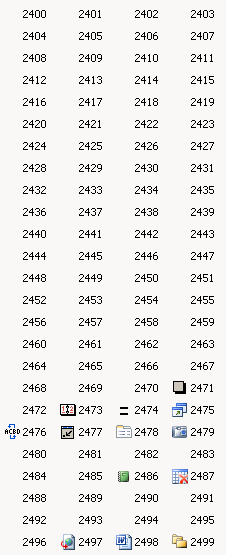
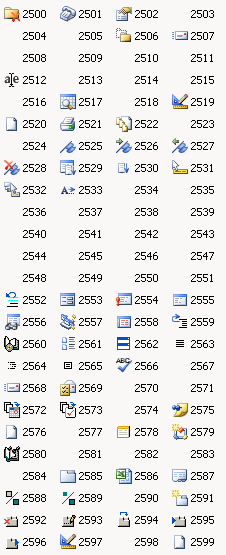
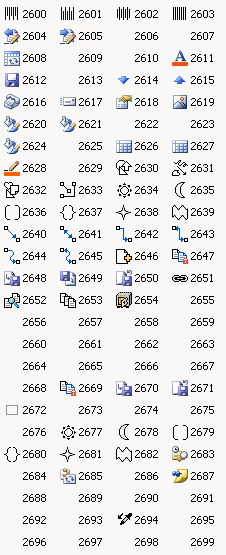
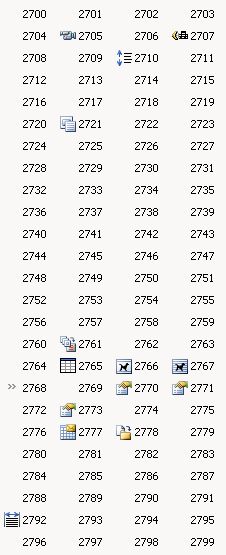
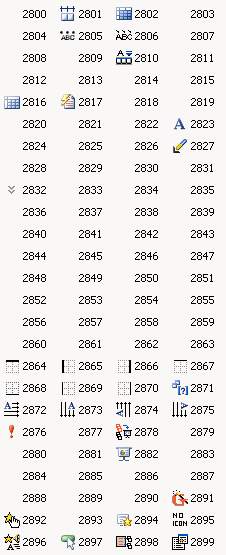
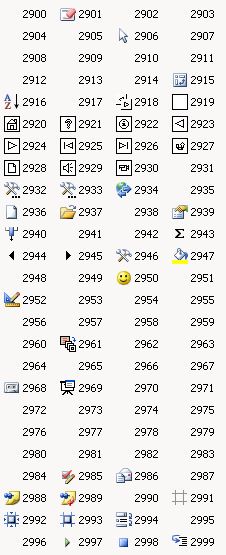
This blog documents the numbers and associated icons as discovered from using the various FaceId numbers in Outlook. I have not yet cross-checked the icon numbering with different applications. Lower down this page, I’ll comment briefly on how I got these images later in the document.
The Icons
The number to the right of the icon is the appropriate FaceId to use:
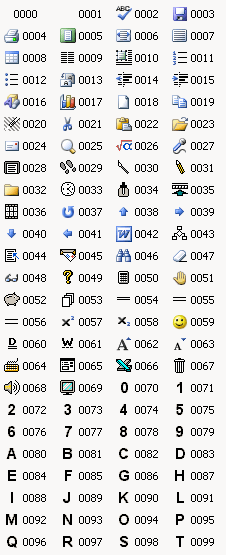
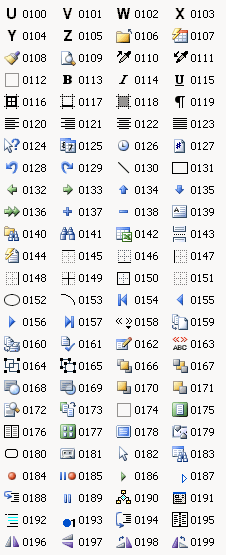
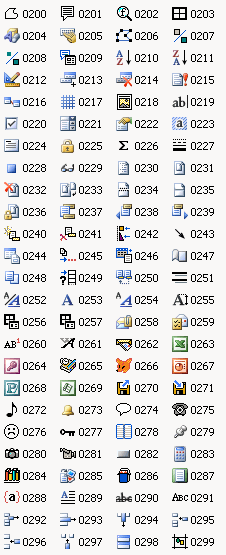
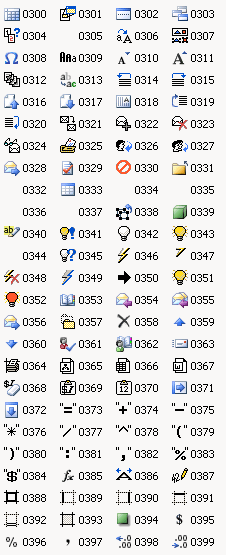
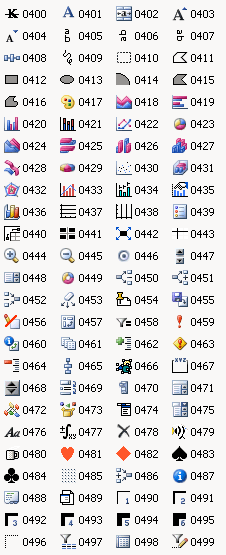
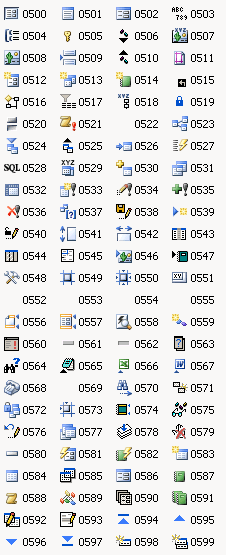
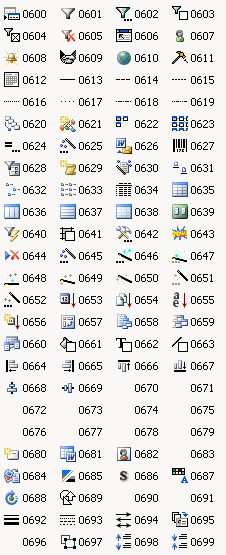
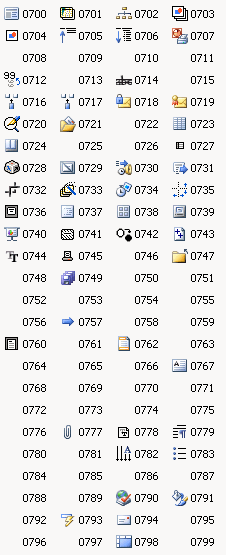
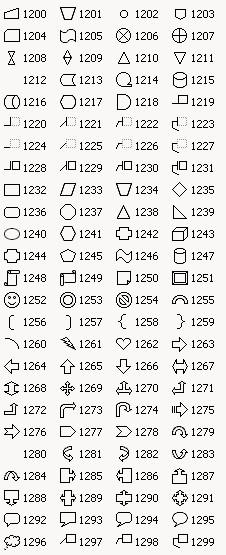
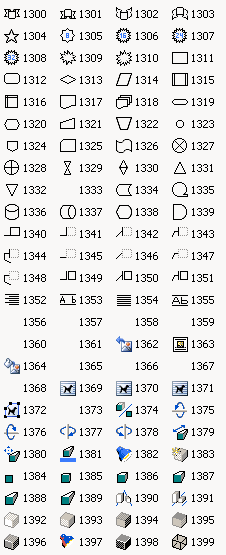
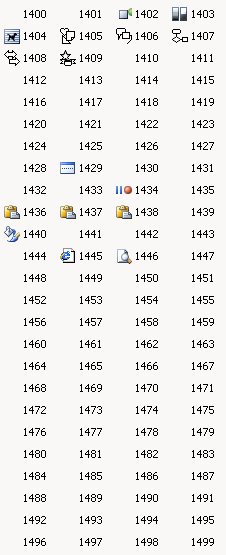
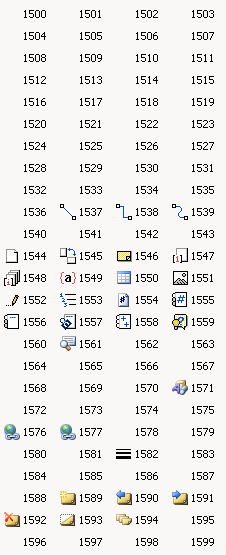
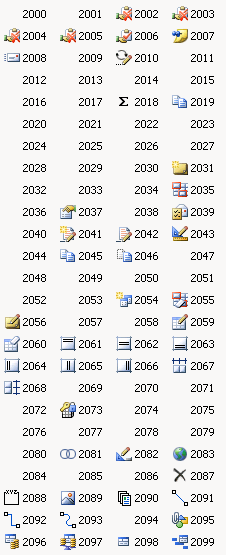
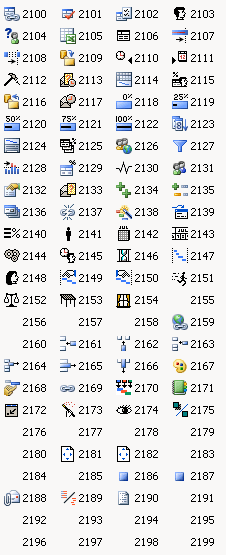
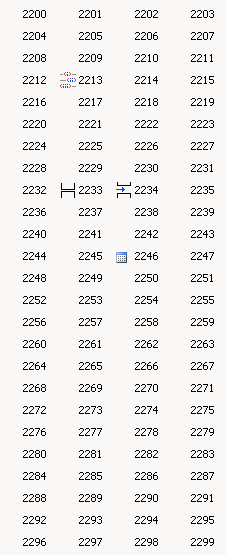
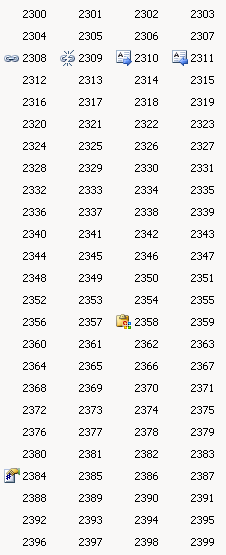
How I Made These Images
MSDN Support had a very tempting page which refers to ‘Finding FaceID Numbers for Your Microsoft Office 97 Toolbars’; but that text is not linked and does not retrieve anything on a search; though the text suggests that it (should have been) a tool to provide documentation of these FaceId’s in an Excel spreadsheet. Tempting, therefore, but fruitless (even if it referred to past versions, perhaps it might have helped?)
So, I wrote a little piece of code to create an Outlook toolbar with 104 buttons (the first 4 buttons being repeated, so there were 100 unique faceId’s), each with a FaceId and a text caption of the number used to achieve the icon. Making the Outlook window very narrow (so only the first four buttons were displayed) meant that clicking on the toolbar expansion button gave a drop-down with 100 unique buttons on. A bit of jiggery pokery with a screen-shot gave the necessary images. It was a pain to be such a manual process, but there you go; sometimes these things can’t be helped… I did decide to stop at 2999 though 😉
Maybe my OCD will cut in soon though and compel me to find the last icon…
[Added 24/1/07: I have now added a post with FaceId’s 3000 – 3999 for your enjoyment.]
[Added 25/10/09: Here is the source code for the project, which embarrasses me as the whole project was painful to get the screenshots… but here goes TestOutlookFaceId.zip.]
[Added 13/5/13: Added a new page to hold the most useful links from these pages VS 2005 Command Bar Buttons.]
Thanks a lot for sharing the icons and its face ids, it was of great use to my own dev work.
I’ve created a PDF out of the above icons, which I can send it to you for sharing on this website. If you would like it, please send me an email and I’ll attach the pdf as a reply to it.
Thanks once again for a wonderful effort.
Thank you very much!!!
Good to see I’m not the only one that doesn’t like searching in MSDN 🙂
Very useful and hard to find!
Thank you!
Thanks for publishing these. I really wish MS published this kind of stuff.
I usually don’t comment but I had to thank YOU ! You saved me a couple of hours easily. Thank you VERY much.
Nice Job !
Mike